Basic — just tell me what to do
You are about to record a machine. Follow the six steps. No theory needed.
Six steps
- Mount the camera.Tripod, clamp or magnet. Never in your hand.
- Turn off image stabilization.It removes exactly the movement you are recording.
- Set the frame rate.30 fps under 700 RPM · 60 under 1400 · 120 under 2800 · 240 above that. Use the calculator below if you want it exact.
- Set how long you record.Fast machines: 5 seconds. Under 600 RPM: 10 seconds. Under 60 RPM: 35 seconds or more.
- Fill the frame.The machine takes up half to two thirds of the picture. Keep a wall, column or the floor in the rest. Lock focus. Wipe the lens.
- Send the original file.Not through WhatsApp, Teams or email — they re-compress it and the detail is gone. Cable, AirDrop, or an original-quality upload.
That is the whole method. Everything below explains why, and how to do better when the machine is unusual.
Set the camera for what you want to measure
Enter the shaft speed and how far up the harmonics you need to go. The two settings come straight out of the arithmetic above.
Set the camera to
- Frame rate
- —
- Record for
- —
- Your measurement window
- —
- Sensitivity
- —
Before pressing record
- The machine is running normally and at a steady state; the shaft speed is noted.
- The camera is mounted — tripod, clamp or magnet. Not in a hand.
- Stabilization is off.
- Frame rate chosen for the fastest frequency of interest.
- Duration chosen for the slowest frequency of interest.
- Focus and exposure locked; the lens is clean.
- The part of interest fills half to two thirds of the frame, with something still in the rest.
- Nothing else is moving in frame — people, vehicles, steam, hanging chains.
- Nobody touches the camera while it records.
Intermediate — get a better recording
The choices that separate a usable clip from a good one, and what to expect back.
Mounting: the one that outweighs everything else
A camera measures how much things move between frames. If the camera itself moves, that movement is added to everything in the scene — and unlike focus or exposure, it cannot be undone afterwards.
This is the cheapest thing on the list to get right and the most expensive to get wrong.
Do
- A tripod on solid floor — the default, and good enough almost always.
- A clamp or magnetic mount on a structure that is not the machine being filmed.
- If the only vantage point is a structure that vibrates, use it — but write that down with the recording. A measurement read relative to a known moving structure is honest and still useful.
Avoid
- Handheld. Hand tremor is far larger than the movement you are trying to capture, and it is irregular, so it cannot be modelled away.
- Walkways, handrails and gratings that people walk on during the recording.
- A tripod standing loosely on a vibrating platform — it will slide and rock unpredictably.
Turn image stabilization off
Optical and electronic stabilization exist to remove small movements — precisely the ones being recorded. Worse, they remove them unevenly, fighting some frames and not others, which adds a motion that was never in the scene. On a properly mounted camera, stabilization only makes the result worse.
Distance and framing decide the sensitivity
Movement in a video is measured in pixels. What one pixel is worth in the real world is set by your framing, and by nothing else: it is the width of what you framed divided by the width of the image in pixels.
Framing tighter therefore makes the measurement finer. Four times closer is four times finer, and it costs nothing but walking.
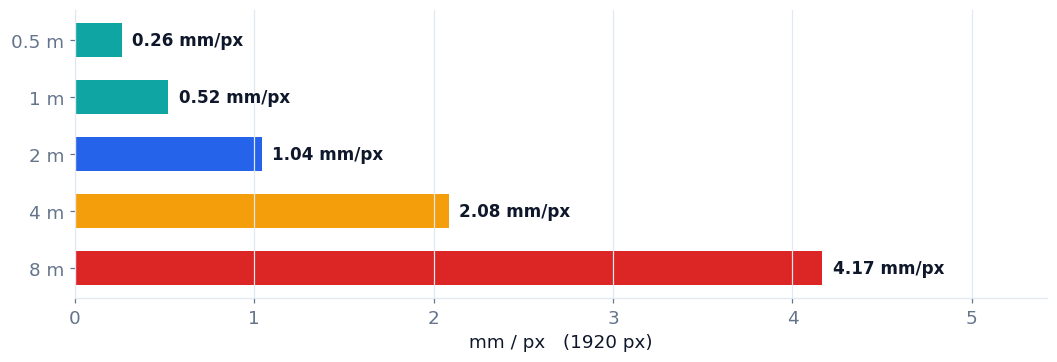
- Let the part of interest fill roughly half to two thirds of the frame, and keep something that does not move — a wall, a column, the floor — inside the rest.
- Film perpendicular to the movement of interest. Motion toward or away from the camera is largely invisible.
- Include the bearing housings, base and anchor bolts. That is where looseness and cracking appear.
- Never use digital zoom. It invents pixels: no detail is added and the very motion being recorded is smoothed. Walk closer, or use optical zoom.
- Record at the highest resolution available and do not crop afterwards — cropping throws away the sensitivity you gained by walking closer.
For trending, frame it the same way every time
Because the unit is pixels, the same machine framed differently produces different numbers — half as wide a frame doubles every reading with nothing having changed. Mark the tripod position, note the distance, and repeat it. A repeatable measurement is worth more than a sensitive one.
Light, sharpness and contrast
These three are one problem seen from three sides. Motion blur is measurement already lost — if an edge smears during a single exposure, that frame has averaged the movement away, and no processing recovers it. More light buys a shorter exposure, and a shorter exposure is what freezes the motion.
- Lock focus and exposure before recording. Autofocus hunting mid-clip ruins the clip.
- Check one still frame before leaving. Zoom into a bolt head or a painted line: crisp is done, smeared means more light or a faster shutter.
- Light from the side, not from behind the machine. Backlighting produces a silhouette — an outline with no surface texture inside it.
- Avoid glare and wet, shiny surfaces. A specular highlight moves when the camera or the lamp moves, not when the machine does.
- Surfaces need visible texture — bolts, paint edges, weld seams, grime. If a surface is genuinely featureless, add high-contrast markers, firmly stuck: a marker that flutters is measuring itself.
- Wipe the lens. Dust scatters light and flattens contrast, and it comes back during the shift.
Watch the lighting flicker
Discharge lamps — high pressure sodium, metal halide, older fluorescents — pulse at twice the supply frequency: 120 Hz on a 60 Hz supply, 100 Hz on 50 Hz. That pulsing is brightness change, and brightness change can be mistaken for movement. It is worst when it lands near the frame rate or its Nyquist limit. Prefer daylight or modern flicker-free LED, and if you must film under discharge lamps at high speed, add a steady light aimed at the part of interest.
Getting the file off the phone without ruining it
A good recording can still be destroyed between the camera and wherever it is going.
Do not send it through a messaging app
Messaging and mail platforms re-compress video hard, and that compression works by smoothing away small differences between frames — exactly the content of the recording. Send the original: cable, AirDrop, or an upload that preserves original quality.
The slow-motion trap
Some phones save a slow-motion clip already slowed down: five seconds filmed at 240 fps become a forty second file that claims 30 fps. The pictures are right, but every frequency derived from it will be eight times too low. Check that the file length matches the time you actually stood there — if it is longer, the clip was pre-slowed. Export the original, or use the camera’s high frame rate mode instead of its slow-motion mode.
- Do not trim, edit, filter or stabilize afterwards. Editors re-encode, and some stabilize silently.
- Do not screen-record a playback. That resamples the timing and discards frames.
- H.264 and HEVC are both fine. If the phone asks, “most compatible” is a safe answer.
- Write down the machine, the location and the shaft speed. Five seconds of typing, and the recording becomes interpretable by someone who was not there.
What to expect
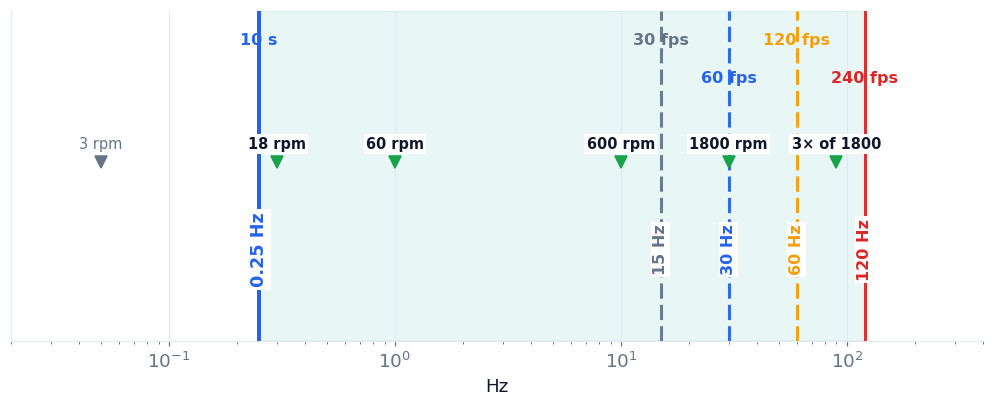
You will see the band you paid for, and nothing outside it. A ten second clip at 30 fps covers roughly 0.25 Hz to 12 Hz. That is a wide and useful range, and it excludes both a kiln shell and the harmonics of a four pole motor.
Some surfaces will not measure. Smooth, glared or featureless areas give nothing to track. This is a property of the scene, not a failure — and it is better reported than guessed.
Low frequency energy is often trend, not vibration. In a short recording the lowest part of the spectrum is dominated by drift: the camera settling, the structure breathing, the light changing. Longer recordings, not faster ones, are what separate the two.
The first recording is a rehearsal. Check it on site: is the framing tight, is the edge sharp, does the file length match the clock. Two minutes there saves a second trip.
Advanced — where the numbers come from
The arithmetic behind the two settings, for anyone who wants to check it or teach it.
A recording has two walls, and they are set independently
A camera is a sampler that happens to take pictures, so it obeys the same limits as any other sampled measurement. Two of them matter, and they come from two different decisions.
How long you record sets the slowest movement you can resolve. How fast you record sets the fastest. Neither can be fixed later, and a clip can easily be too short and too slow at the same time.
Duration sets the slow wall
To resolve an oscillation, the recording must contain several of its cycles. One cycle is not a measurement — it is a trend.
A useful working rule is ten cycles, and never less than five seconds. Below about 10 Hz that is the number that decides your recording length; above it, five seconds costs nothing and gives far more than the minimum.
| Equipment | Speed | Frequency | Record |
|---|---|---|---|
| Motor, fan or pump | 1800 RPM | 30 Hz | 5 s |
| Motor | 900 RPM | 15 Hz | 5 s |
| Induced or forced draft fan | 600 RPM | 10 Hz | 5 s |
| Conveyor pulley | 60 RPM | 1 Hz | 10 s |
| Mill, agitator, cooling tower | 18 RPM | 0.3 Hz | 35 s |
| Very slow drives | 12 RPM | 0.2 Hz | 50 s |
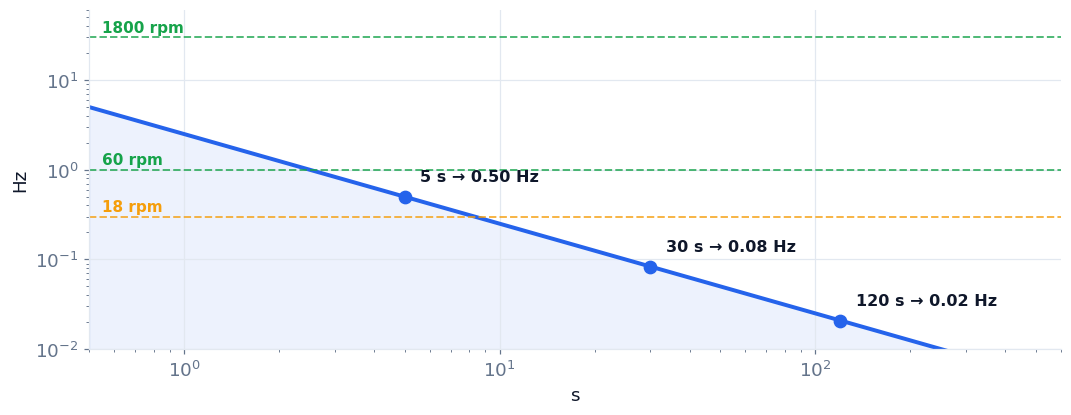
Below roughly 12 RPM the rotation of the shaft itself stops being a practical target for video. That is rarely a problem: on slow machinery the interesting parts — support rollers, pinions, gearboxes, bearing housings and the foundation — turn far faster, and the required recording collapses back to seconds.
Frame rate sets the fast wall
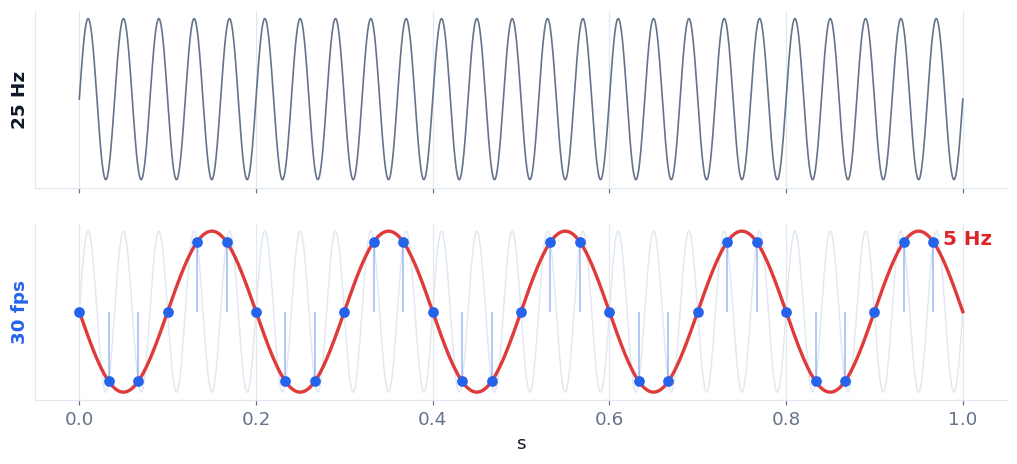
A camera cannot see anything faster than half its frame rate. That half-way line is the Nyquist frequency, the same limit every vibration analyzer obeys.
Above it, fast movement does not simply get weaker. It folds back and appears as a frequency that is not there — which is far more dangerous than seeing nothing at all.
Why 2.5 and not 2
Nyquist says a signal exists above two samples per cycle; it does not say it can be measured there. Right at the line, amplitude collapses and the reading beats in and out. Vibration analyzers have used a 2.56 factor for decades for exactly this reason. Plan with 2.5 — it is the same margin and it can be done in your head.
| Phone setting | Nyquist | Usable to | Reaches 1× of | Reaches 3× of |
|---|---|---|---|---|
| 30 fps | 15 Hz | 12 Hz | up to 720 RPM | up to 240 RPM |
| 60 fps | 30 Hz | 24 Hz | up to 1440 RPM | up to 480 RPM |
| 120 fps | 60 Hz | 48 Hz | up to 2880 RPM | up to 960 RPM |
| 240 fps | 120 Hz | 96 Hz | up to 5760 RPM | up to 1920 RPM |
Harmonics are where mechanical diagnosis lives — misalignment at 2×, looseness at 2× and 3×, blade pass at the blade count. A recording that only reaches 1× shows that something moves, not why. Read the last column: an 1800 RPM motor needs 240 fps before its third harmonic is inside the recording at all.
What an ordinary phone gives you
Most current phones offer 30 and 60 fps in normal video, and 120 and 240 fps in slow-motion or high frame rate mode. No special camera is needed for any of the rows above. Two things to watch: high frame rate modes usually drop the resolution, which costs sensitivity, and they often cap the clip length — which is a problem on slow machinery that needs a long recording. When a machine is slow, choose resolution and duration over speed; when it is fast, choose speed.
The habit that matters
Before arguing about a result, look at the window the recording could see. Duration set one wall and frame rate set the other, and no analysis can reach outside them. Most disagreements about a measurement turn out to be disagreements about the recording.